ME ThreadPal - here's the thread data you need!
| · |
Detailed Data For Thirty-Seven Thread Types |
| · |
Fifteen-Hundred Built-In Thread Sizes |
| · |
Calculations For Custom Diameters And Pitches |
| · |
Thread Wire Sizes - Best, Maximum, Minimum, and Yours! |
| · |
Pitch Diameter Measurements For Multiple-Start Threads |
| · |
Lead Angle Calculations |
| · |
Plating And Application Guidelines |
| · |
Intelligent Tap Drill Chart |
| · |
Data For Cut And Form Taps |
| · |
Graphical Popups To Illustrate Thread Terminology |
| · |
Inch Or Metric Display |
| · |
Detailed Printed Report |
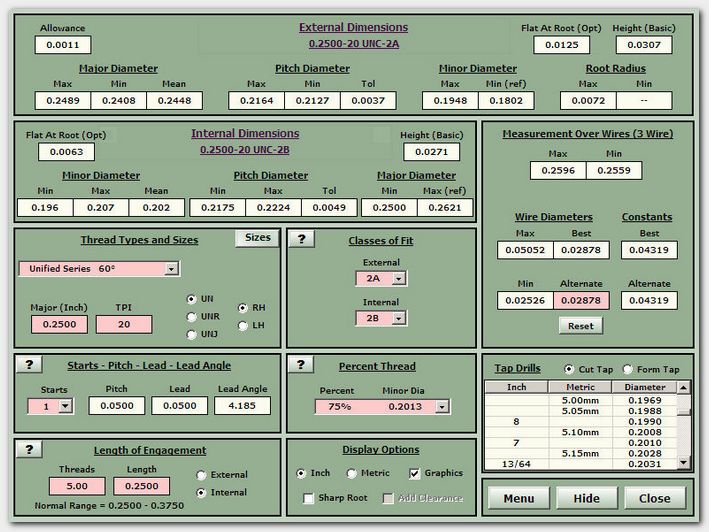
This is what ME ThreadPal looks like.
All this data for any of the 1500+ built-in threads can be displayed with two or three mouse clicks. Typing is required only when you need to enter the major diameter and pitch of a special thread, change the actual wire size, or change the number of thread starts.
Every value you see is based on data and formulas taken from national and international standards, military specifications, and industry-standard reference books. It's all been checked with extreme care.
The Thread Selector
The Thread Info Window
These are the thread types that are supported by ME ThreadPal. A mouse click to select one, two more to specify a size. You're done.
The ten underlined thread types also accept user-input combinations of major diameter and pitch.
Plating buildup changes the pitch diameter at a rate which is determined by the included angle.
An internal UNJ thread has an increased minor diameter, and the internal root doesn't have a controlled radius.
It's best to learn things like these before you make your parts, and without spending a lot of time in the process.
Graphic Popups
Clicking on a value will open a graphic window with a picture of the thread feature associated with that value. This one shows the external major diameter.
Text on the popups is symbolic, in the hope that easily-recognizable symbols will help non-English speakers to use the program. In this case, the up-arrow is used to signify "maximum".
The graphics feature can be turned off when not needed.
Print A Report
Sometimes there's just no substitute for a "hard copy" - today for the machinist or supervisor out in the shop, tomorrow for the inspector, next day for the manufacturing engineer, tool crib, or CNC programmer. ME ThreadPal gives you what you need in seconds - everything that's important for manufacturing, accurate and organized.
ME Machining Software
Tools for Metalworking Professionals
Created by
Michael Rainey